
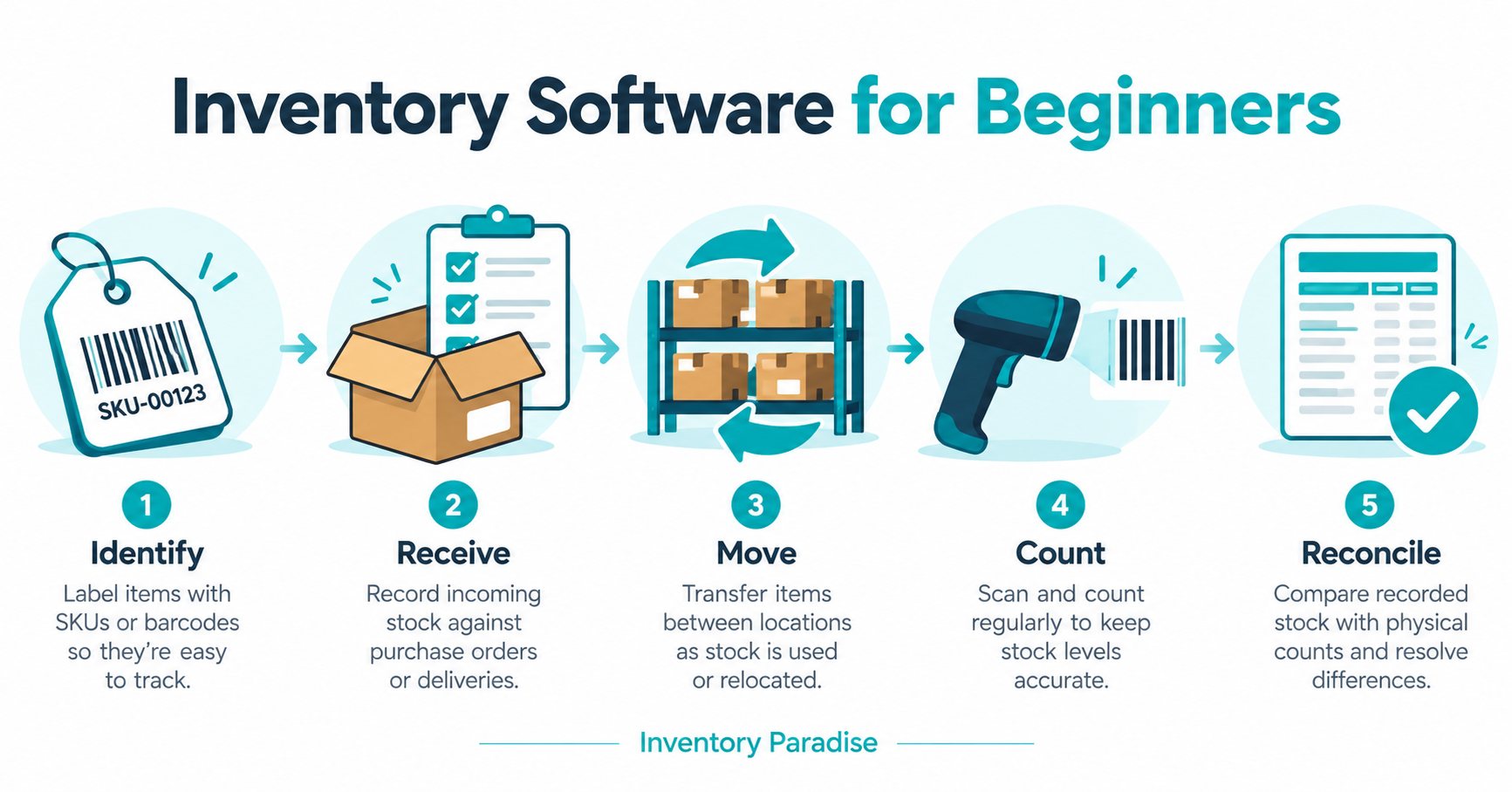
Inventory software needs a clear operating process behind the numbers. Before comparing dashboards, define what your business owns, where stock sits, how quantities change and who investigates a mismatch. A tidy interface does not correct an unrecorded transfer or a carton entered as a single unit.
This guide helps a small business prepare its first inventory system or replace a spreadsheet with a controlled pilot. The focus is workflow design and software evaluation. Examples are hypothetical, rather than reports of direct product testing. Confirm accounting treatment, contractual responsibilities and regulated-product requirements with qualified advisers.
Read the editorial standards for our research approach. The Inventory Paradise Blog will collect supporting guides as the publication grows.
In this guide
- Define the inventory problem before selecting software
- Create a usable item master
- Define locations and stock states
- Record receiving as a controlled transaction
- Capture transfers, picks and returns consistently
- Establish an opening balance you trust
- Use counts to find causes, not only differences
- Separate replenishment assumptions from facts
- Compare software through a requirements table
- Test integrations and recovery paths
- Give staff permissions matching their responsibilities
- Run a small, measurable pilot
- Questions to answer before committing
- Start with one reliable stock workflow
Define the inventory problem before selecting software
Start with a recent operational failure. An order appeared available but the shelf was empty. A purchase arrived without an agreed receiving process. Two locations reported different totals for the same item. Write the sequence down and identify the missing record, unclear responsibility or delayed update. A specific failure gives your software trial a useful test.
Separate stock control from broader planning. Recording a receipt and explaining a quantity difference are stock-control tasks. Deciding how much to order next involves demand, supplier lead times and business judgment. A replenishment suggestion depends on the records and assumptions supplied. Treat a recommendation as a decision requiring review, rather than a substitute for understanding demand.
Document the current workflow in plain language. List who orders, receives, stores, transfers, picks, ships, counts and approves adjustments. Include temporary staff, contractors and outside warehouses. Choose one person responsible for maintaining the operating instructions. If every department uses a different definition of available stock, resolve the definitions before importing data.
Create a usable item master
An item master is the reference list behind stock transactions. Give each stocked item a stable internal identifier and a clear description. Record the unit used for stocking, purchasing and selling. A supplier selling a case of twelve while your store sells individual units creates a conversion requirement. Test the conversion with a real example before accepting an opening balance.
Keep distinct variants distinguishable. Size, color, pack quantity and other meaningful differences need consistent records. Avoid encoding every changeable fact in the internal identifier. A location or supplier often changes without changing the identity of the item. Preserve a mapping between old identifiers and replacements so staff retain a way to investigate historical transactions.
Internal item codes and external trade identifiers serve different purposes. GS1 explains the relationship between GTINs and barcodes: a barcode represents an identifier in a scannable form. Check identifier requirements with your trading partners and the relevant issuing organization. A scanner does not create a reliable catalog from inconsistent item records.
Assign ownership for catalog changes. Ask who creates a new item, approves a unit conversion and retires a duplicate. Require a short reason for changes affecting stock interpretation. Avoid deleting historical item records during cleanup. Preserve references needed to explain previous receipts, sales, transfers and counts, using the software's supported archive process.
Define locations and stock states
A location should help someone find and handle an item. Begin with a small understandable hierarchy, such as warehouse, aisle and bin. Give each location a durable label and explain how staff report a move. Avoid creating hundreds of unused bins for an imagined future warehouse. Add detail when the physical process supports accurate maintenance.
Quantity also needs a state. Stock received into inspection is different from stock available for a new order. Damaged goods, returns awaiting review and items committed to existing work need clear treatment. Define which states contribute to availability and which require approval before release. Confirm the software's actual behavior with a worked transaction.
Ownership and physical possession are separate questions. Consigned stock, customer-owned material and goods held by a third party need explicit rules. Write down the party responsible for updating quantities and reporting exceptions. Review the related agreement with the appropriate adviser. Do not infer ownership from the presence of an item on a shelf or a software screen.
Record receiving as a controlled transaction
Receiving starts with an expected delivery and ends with a documented result. Match the delivery to the relevant order or reference. Record item identity, counted quantity, unit, condition and destination. If the shipment is incomplete, preserve the difference instead of changing the original expectation to match whatever arrived. The exception needs an owner and a next action.
Use a separate path for unidentified or disputed goods. Staff should know where to place an unlabeled carton and whom to contact. Do not add uncertain quantities to sellable stock simply to finish the receiving screen. Take only the photographs and documents needed for the business process, following the organization's retention and access rules.
During a trial, test more than the perfect delivery. Enter a partial receipt, a supplier overage, a damaged package and an incorrect item. Check how the system records the reason and prevents the same delivery being entered twice. Ask a second employee to follow the resulting transaction history without an explanation from the original receiver.
Capture transfers, picks and returns consistently
A transfer needs a clear origin, destination and quantity. Decide whether stock moves immediately or passes through an in-transit state. If two people participate, define who confirms dispatch and who confirms arrival. Review how a short shipment between locations is investigated. A total across the company might appear correct while individual bins remain wrong.
Picking and shipping need an agreed relationship. Reserving an item, removing stock from a bin and confirming shipment are different events. Test the points at which the software changes available and physical quantities. Include canceled orders, partial picks and failed shipments in the trial. Staff need a documented way to reverse an incorrect action without inventing a replacement transaction.
Returns deserve their own review process. An item returned by a customer should not automatically become available for resale before the required inspection. Record the reference, condition and decision. Check how the selected system handles a returned kit, missing component or different serial number when these scenarios apply. Preserve the original record and assign the exception to a responsible reviewer.
Establish an opening balance you trust
Opening balances establish the point from which later transactions are interpreted. Choose a cutover time and define how receipts, picks and transfers are handled during the count. An unexplained mixture of old spreadsheet totals and live warehouse movements makes reconciliation difficult. Tell staff when the new process begins and where they record exceptions.
Prepare the count by cleaning identifiers and confirming locations. Separate damaged, quarantined and customer-owned material before assigning quantities to states. Use consistent units on count sheets. A counter entering cartons while another enters individual pieces creates a preventable mismatch. Recount unusual results and retain the reason for approved corrections.
Preserve a recoverable copy of the source data before importing. Use a small sample import first and review field mapping, decimal handling and leading zeros in identifiers. Compare imported quantities by item, location and state, rather than checking only a company-wide total. Require a named sign-off before using the opening balance for operational decisions.
Use counts to find causes, not only differences
Physical counts compare recorded quantities with observed quantities. A periodic approach counts stock at defined intervals. A perpetual approach records transactions as they occur, supported by physical checks. ASCM describes these inventory-control approaches. Choose a process appropriate to the business and verify the selected software supports the required records.
For a small pilot, select a manageable group of items and count them on an agreed schedule. Include an important fast-moving item, an infrequently moved item and a location with recurring differences. Record the count time and relevant transactions around the count. Avoid changing the system balance while someone else is still moving the same stock without coordination.
Investigate a mismatch before approving an adjustment. Look for an unrecorded transfer, incorrect unit, duplicate receipt, misplaced item or timing difference. Document the cause where evidence supports a conclusion. Use a separate unresolved category when the evidence is incomplete. A reason code selected to clear the screen adds little value if nobody follows up.
Separate replenishment assumptions from facts
Replenishment depends on more than a low-stock alert. Record the supplier lead time, order constraints, expected demand and the business's tolerance for shortages. Identify which inputs are measured and which are planning assumptions. A minimum order quantity or pack multiple changes a purchase recommendation even when the desired quantity appears straightforward.
Use simple worked examples during evaluation. Suppose a hypothetical item sells ten units per week and the assumed replenishment lead time is three weeks. The expected demand during the assumed lead time is thirty units. This arithmetic is an illustration, not a recommended reorder policy. Variability, existing commitments, incoming stock and the cost of a shortage need separate review.
Ask how the software explains a suggestion. A reviewer should see the quantities and assumptions behind a proposed order. Test whether an unusually large sale distorts the result and how the team records a known one-time event. Preserve human approval for purchasing commitments. Software-generated urgency does not establish a supplier obligation or spending authorization.
Compare software through a requirements table
Write requirements as observable actions. Replace “good integrations” with “a paid order reserves the correct variant and a cancellation releases the reservation.” Replace “easy reporting” with “the inventory owner exports quantities by item, location and state and reconciles the export.” Give each requirement an owner, evidence and a pass condition.
| Area | Test during the pilot | Evidence to retain |
|---|---|---|
| Item master | Import identifiers and multiple units without altering meaning | Reviewed mapping and sample records |
| Receiving | Record partial, damaged and duplicate delivery scenarios | Transaction references and exception outcome |
| Locations | Transfer stock and reconcile both endpoints | Origin, destination and movement history |
| Sales connection | Reserve, cancel and partially ship a sample order | Before-and-after quantities and sync behavior |
| Counts | Investigate a variance and approve a documented adjustment | Count record, reviewer and reason |
| Access | Restrict adjustments to authorized roles | Tested permissions and approval path |
| Export | Recover usable catalog and transaction data | Sample files and field definitions |
Keep essential requirements separate from preferences. An attractive dashboard should not outweigh a failed unit conversion or missing audit trail. Confirm current plan limits, location allowances, user permissions, export options and connector charges directly with the provider. Save the date and source of the information. This guide does not rank vendors or claim hands-on testing of a specific product.
Test integrations and recovery paths
Every connection needs a defined source of truth. If both the sales platform and inventory application allow quantity changes, decide which system owns the operational balance and how exceptions are resolved. Document the direction, timing and scope of each transfer. A successful initial sync does not demonstrate reliable behavior during returns, cancellations or interruptions.
Test a controlled failure. Disconnect a permitted test connection, queue a sample transaction and observe the recovery process. Ask how failed events are surfaced and who responds. Review duplicate handling before retrying a transaction. Preserve a reference linking the source order to the resulting inventory event so a reviewer has a useful investigation path.
Avoid exposing live customer information in screenshots, demonstrations or support tickets. Use synthetic records for the pilot whenever possible. The FTC's business guidance on protecting personal information emphasizes understanding retained information, limiting unnecessary collection and controlling access. Apply the business's own approved security and retention process to integrations and exports.
Give staff permissions matching their responsibilities
A receiver, picker, catalog editor and adjustment approver need different capabilities. Write a short role matrix before granting access. Test the ordinary user account, rather than relying on an administrator demonstration. Confirm which actions require review and whether transaction history records the responsible account. Avoid sharing one login across the warehouse team.
Plan for absences and departures. Assign an alternate reviewer and document how access is removed through the normal process. Inventory exports often contain supplier details, purchasing information and commercial records. Decide who needs these files and where approved copies are stored. Include scanners and mobile devices in the access review.
Train staff using the actual exceptions from your pilot. A short receiving exercise with a partial delivery teaches more than a tour of every menu. Provide instructions near the work area and a clear contact for questions. Treat repeated workarounds as evidence of an unclear process or poor fit, rather than assuming the operator is the only source of error.
Run a small, measurable pilot
Choose a limited location or item group with meaningful but manageable activity. Define the pilot period, responsible staff and rollback plan. Preserve the existing records until the new process passes review. Set a daily time for checking unresolved events. Avoid broad rollout while the team still disputes the meaning of an inventory state.
For a hypothetical pilot, a small distributor tests twenty item records in one storage area. The team records a receipt, a transfer, a partial shipment, a return and a count discrepancy. One employee enters each scenario and another reviews the history. Success means the team explains the resulting quantities, finds the exceptions and exports usable records. No efficiency or accuracy improvement is assumed in advance.
Track a few defined measures. Count unresolved exceptions, review time and records requiring correction. State the observation window and the number of transactions reviewed. Compare similar work before drawing conclusions. A pilot with only ideal transactions offers weak evidence about a busy receiving day or a failed connection. Record remaining risks and assign owners before expanding.
Questions to answer before committing
Is a spreadsheet enough for a small operation?
A spreadsheet supports some simple workflows when identifiers, access, updates and counts are controlled. Consider the actual coordination problem. Multiple staff, locations, frequent transactions or connected sales channels increase the need for consistent records and permissions. Evaluate the cost of errors and maintenance alongside subscription costs. There is no universal item-count threshold in this guide.
Does barcode scanning prevent inventory mistakes?
Scanning helps capture an identifier. The item mapping, unit, location and transaction still require correct setup and handling. Test unreadable labels, alternate pack sizes and mistaken selections. Give staff a documented exception process instead of encouraging improvised replacements. Verify the selected devices and formats with the provider and your trading partners.
Which reports should a beginner review first?
Start with quantities by item and location, unresolved receiving or transfer exceptions, count differences and items requiring replenishment review. Define the purpose and owner of each report. Compare the report to underlying transactions during the trial. A useful report leads to a decision or investigation, rather than adding an unexplained number to a weekly meeting.
What should be preserved when switching systems?
Keep approved exports, field definitions, identifier mappings, opening balances and the records needed to explain historical transactions. Confirm retention obligations with the relevant advisers. Test access to the exported files before ending the previous service. A filename alone does not demonstrate a complete or interpretable archive.
Start with one reliable stock workflow
Prepare the item master, locations, states, transaction responsibilities and count instructions. Then test a small set of ordinary and exception scenarios against the software requirements. Expand only after the team explains the resulting balances and handles failures through a documented process.
Visit the homepage for Inventory Paradise's scope and the Blog for supporting research. Use the contact page to suggest a correction or topic. Keep private supplier, employee and customer information out of messages to the publication.

Trevor Fenner publishes software research and practical business workflow guides. Inventory Paradise distinguishes documented capabilities, hypothetical examples and direct testing. Read the editorial standards for the research process.